



It’s 9:02 AM. A new engineer opens her onboarding email, clicks the link, and sees an error message: expired token. Someone else tries to register in the mobile app, but the SMS verification code never arrives. A partner signs in with Google Single Sign-On (SSO) and lands in a half-configured state, unsure how to proceed. Each case seems minor in isolation, but across an organization, these issues create real friction.
A unified onboarding system fixes this by centralizing logic and enforcing consistent behavior across all channels. With Keycloak, every path – email, SMS, magic link, mobile, or external IdP – runs through the same identity engine, making onboarding clearer for users and easier to maintain for teams.
This blueprint outlines how to design and implement a complete multi-channel onboarding flow using Keycloak, with practical examples, technical patterns, and deployment guidance.
Understanding modern onboarding flows
Onboarding often gets mixed up with provisioning, but they solve different problems. Onboarding creates a usable identity – collecting initial profile fields, verifying email or phone numbers, and establishing trust in the account. Provisioning comes afterward and assigns roles, entitlements, or access rights. When these stages blur together, onboarding becomes heavy, inconsistent, and harder to maintain across products.
Modern products don’t have a single entry point anymore. One user signs up through an invite link. Another lands on a public registration page. Mobile users expect a phone-first path. Enterprise customers arrive through SSO. The variety is normal; the challenge is delivering a consistent onboarding experience across all these channels.
When onboarding breaks, the impact shows up fast. The symptoms aren’t subtle:
- Email verification fails, and the user never activates the account.
- SMS codes don’t arrive, so mobile users abandon the flow.
- SSO logins miss required attributes, leaving users stuck in loops.
- Issues like these erode trust and generate support tickets that shouldn’t exist.
All of this tends to happen when onboarding logic is scattered across applications. Each team builds its own verification rules, its own email or SMS handling, and its own way of storing user state. But maintenance doesn’t have to be a chase.
What Keycloak is and why it matters for the business
Keycloak is an open-source identity platform that replaces custom login systems with a single, consistent service for authentication and user management.
Instead of every application handling passwords and security on its own, Keycloak becomes the central entry point for all users – employees, customers, or partners. This reduces operational risk, removes duplicated work across teams, and ensures the business has one reliable place to manage access.
The platform works with existing systems without heavy integration work. Keycloak can:
- Connect to corporate directories such as Active Directory or LDAP.
- Support single sign-on using external providers like Microsoft, Google, or GitHub.
- Run in standalone mode for SaaS products that manage their own identities.
- Apply consistent policies across channels, whether users log in through the website, mobile app, or a partner portal.
- Maintain a single session so users authenticate once and stay signed in across all connected services.
Keycloak solves this by pulling onboarding into a single identity layer. Instead of fixing the same issue in multiple services, teams define the flow once and let every product and channel use it.
To cite a few examples, when marketing launches a new landing page or the mobile team ships an update, onboarding doesn’t have to be rebuilt. Email verification, SMS checks, profile collection, and SSO mapping all come from the same system. Keycloak gives the organization a single control point for onboarding, reducing chaos as the product scales.
Onboarding vs. provisioning
Before designing a multi-channel onboarding system, it helps to separate onboarding from provisioning. Teams often mix these concepts, and that’s usually why onboarding flows become slow, unpredictable, or overloaded with logic that doesn’t belong there.
Digital identity guidelines such as NIST SP 800-63 explicitly separate identity proofing from access control, treating them as distinct stages with different goals and risk profiles. Thus, users should be able to create an account and verify their identity quickly. Everything else – access rights, approvals, roles, policies – happens later. Here’s how the two stages differ in practice:
Onboarding should be predictable and easy to complete. Users shouldn’t be asked to make access decisions or wait for approvals during their first interaction with your product. Provisioning, meanwhile, varies by job role, compliance rules, and internal workflows – so it needs its own pace and governance model.
Entry points into onboarding
Every onboarding system must support different arrival paths. Understanding these helps design flows that adapt without creating separate logic for each scenario.
Email invites
Invites are common in B2B products. Admins send users a link, and the users complete onboarding by verifying their email and finalizing their profile. If invite handling breaks, internal onboarding stalls.
SMS-first registration
Mobile-first onboarding often begins with a phone number instead of an email address. The user receives a One-Time Password (OTP) over SMS and continues onboarding. This path works well where phone numbers act as primary identifiers.
Direct self-registration
Users enter an email or phone number from a public page. These flows need validation, anti-abuse measures, and verification logic to ensure identity data is trustworthy.
Single Sign-On (SSO) or social login
Google, Microsoft, GitHub, or enterprise IdPs authenticate the user. Keycloak creates the user record and may need to collect missing fields afterward.
Mobile deep links
Apps send users into onboarding with additional context like locale, platform, or referring screen. Losing this context leads to disjointed flows.
A unified onboarding model allows these varied entry points to share the same verification and profile-completion logic.
Keycloak capabilities that enable strong onboarding
Keycloak centralizes the identity layer, so onboarding logic can live in one place instead of being scattered across applications. You design the registration and verification flow once, and every product – web, mobile, partner portal, or API client – follows the same rules. Flows, authenticators, and attributes replace custom code inside apps, giving teams a predictable way to manage onboarding.
A complete onboarding flow depends on several of Keycloak’s building blocks working together. Each one handles a different part of the user journey: the order of steps, the data you collect, how users verify ownership of an email or phone number, and how messages reach them reliably. When these pieces are configured cleanly, onboarding becomes consistent across all channels.

Below are the core capabilities that make this possible.
Authentication flow architecture
Authentication flows are structured sequences that define how users progress. They can include required or optional steps, conditional decisions, or alternative branches based on attributes or identity provider information.
A typical browser onboarding flow may look like:
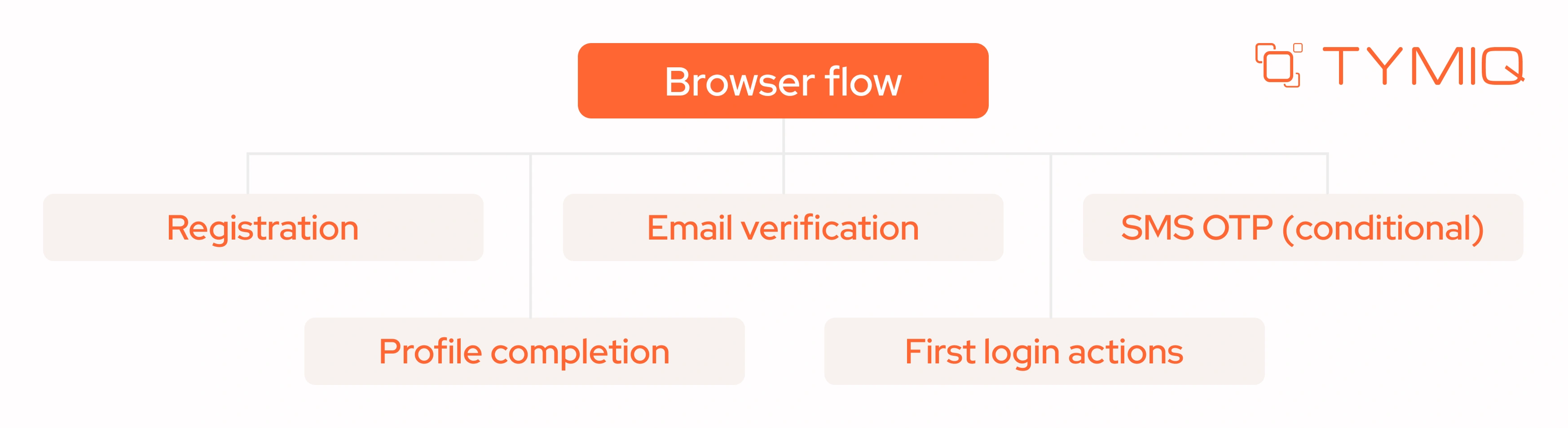
This structure ensures consistency across entry points while allowing flexibility when needed.
Registration flow customization
User Profile configuration controls what data must be collected. You define required or optional fields, validation rules, and visibility conditions. These fields appear directly in Keycloak’s registration forms without application changes.
This flexibility becomes especially important in environments with regulatory or regional requirements. For example, certain jurisdictions may require:
- explicit consent capture (GDPR-style privacy agreements),
- tax identifiers or government-issued numbers,
- localized address or national ID formats,
- age checks for restricted services.
Enterprise customers may also require additional onboarding attributes to support internal governance, such as:
- department or team name,
- cost center codes,
- employee or contractor identifiers.
Consumer-facing products often conditionally request fields only when relevant – for example:
- phone numbers for mobile-first flows,
- demographic information,
- marketing preferences or communication opt-ins.
Account types can further influence what data should be collected. A partner user may need organizational metadata, while an internal user joining through SSO might require only minimal profile confirmation.
By defining these variations centrally in Keycloak, teams avoid maintaining multiple versions of registration logic across applications, making onboarding easier to evolve while keeping the experience consistent across all channels.
Action tokens for magic links
Action Tokens provide a secure, flexible mechanism for performing onboarding-related actions through one-time links. They power several critical steps in modern onboarding flows, including email verification, magic link login, and targeted recovery or profile-completion tasks.
Because they encapsulate intent, user identity, and expiration rules in a signed payload, Action Tokens enable Keycloak to execute sensitive operations without exposing internal state or requiring users to repeatedly authenticate.
A magic link URL may look like:
Each token is signed, short-lived, and bound to a specific user and action, ensuring that only the intended operation occurs when the link is consumed. This design keeps onboarding straightforward for users while maintaining strong security guarantees.
Magic links reveal how Action Tokens reduce friction at key moments of the onboarding journey. Unlike passwords or multi-step verification screens, a magic link lets users advance with a single action, which helps prevent early drop-off and simplifies onboarding on mobile devices where text input is less convenient.
They also support cross-device behavior – a user can request a link on one device and open it on another without losing context. These properties make magic links a practical example of how Action Tokens improve both reliability and usability across different onboarding channels.
Magic links do, however, require well-designed recovery paths. Users often open links after they expire or from a different device than the one that initiated the flow.
Email/SMS providers and templates
Keycloak integrates with SMTP for email and supports custom Service Provider Interfaces (SPIs) for SMS gateways. Templates for messages can be adapted to your brand, localized, and tested as part of the onboarding flow.
Poor deliverability breaks onboarding more often than complex logic does, so these channels should be treated as part of the core identity infrastructure.
Ultimately, all these Keycloak capabilities sit within a broader integration landscape.
In mobile onboarding, a common pattern is Mobile App → API Gateway → Keycloak, where the gateway handles device context, telemetry, and rate limiting before handing off to the identity layer.
Web applications typically follow Browser → OAuth2/OIDC → Keycloak → onboarding events, enabling products to react to verification or profile updates in real time.
Clear boundaries between these components prevent duplication of logic and keep onboarding consistent as the architecture grows.
THE BLUEPRINT: Multi-channel onboarding with Keycloak

A user signs up through your marketing site, another starts onboarding inside the mobile app, and a partner comes in through the SSO entry point. Three different channels, three different expectations – but they all need to flow through one consistent identity workflow. Keycloak can orchestrate these paths without fragmenting your onboarding logic.
The steps below show how to design and implement a multi-channel onboarding system that handles these scenarios cleanly and scales as your product grows.
Before configuring anything in Keycloak, document how users move through onboarding today. Identify entry points, required verification steps, and missing profile fields. This helps expose where flows diverge and where inconsistencies appear.
Create diagrams that capture the onboarding journey across channels. These often reveal mismatched expectations between product teams and actual user behavior. Understanding these patterns guides decisions about how Keycloak should structure the unified flow.
This foundation prevents confusion later when connecting different applications and identity providers.
After mapping the journey, configure the registration flow to reflect the desired onboarding design. Enable self-registration if applicable and set up the User Profile schema. Add fields such as name, phone number, or department as required or optional.
Include email verification and SMS verification steps based on channel needs. If mobile and desktop flows differ, create separate authentication flows that still use shared steps where possible. This ensures consistency without limiting the capabilities of each channel.
Clear registration flow configuration forms the backbone of the onboarding experience.
Magic links streamline onboarding by reducing steps. A user enters an email address, receives a link, clicks it, and continues onboarding without setting a password. Keycloak handles link generation, validation, and expiration.
Magic links work well alongside email verification, since both rely on Action Tokens with secure signatures and controlled lifetimes.
SMS verification is essential in many mobile-first or high-assurance scenarios. A custom Authenticator SPI allows Keycloak to validate numbers, generate One-Time Passwords (OTP), apply rate limits, and handle retries.
Conditional logic helps maintain a clean user experience. For example:
- If onboarding channel = mobile → require SMS OTP
- If user is registered with email → skip SMS unless required by policy
- If OTP delivery fails → allow controlled retries
- If the phone number is already verified → bypass the step
These conditions make SMS onboarding predictable while reducing unnecessary friction.
Users arrive with varying data depending on the channel. SSO may provide name and email, while self-registration may require collecting everything manually. Profile completion gathers missing information.
Keycloak’s First Login Actions enforce requirements without altering application code. You can request fields individually based on what is missing:
- If department is missing → ask for department
- If phone is required for MFA → request phone number
- If terms of service are unaccepted → show consent screen
- If all fields are present → proceed
This keeps onboarding focused and prevents users from encountering long, unfocused forms.
SSO introduces variability because different providers expose different attributes. Mapping and normalizing these attributes ensures a consistent onboarding experience.
Use the following guidelines to avoid issues:
- Map identity provider (IdP) claims intentionally
- Decide whether email verification is necessary based on the provider
- Request missing fields using First Login Actions
- Normalize email and username formats
- Track IdP origin with attributes such as:
With these steps, SSO onboarding behaves predictably, even across multiple IdPs.
Users often switch devices or pause onboarding mid-flow. Tracking progress in attributes ensures they return to the correct step. These attributes are stored on the user object and used by conditional authenticators.
Example attributes:
Flows can then respond accordingly:
- If SMS isn’t verified → enforce OTP
- If profile is incomplete → request missing fields
- If user arrives via SSO → skip password setup
- If onboarding was paused → resume at last completed step
This keeps users from repeating earlier steps or entering loops.
In fact, coss-channel onboarding is now the norm – users often begin on mobile and finish on desktop, or switch between app and browser mid-flow. Without consistent state tracking, they repeat steps or encounter contradictory screens.
By storing the onboarding stage, verification status, and channel context in user attributes, Keycloak keeps all devices aligned. This ensures a seamless continuation of onboarding regardless of where users resume.
Visibility matters, and capturing onboarding logs and metrics provides insight into where users drop off or where verification fails. Email misconfigurations, SMS delivery issues, and misrouted flows appear clearly when instrumented.
Integrate Keycloak events with tools such as Datadog, Elastic, or Splunk.
Metrics to track:
- Action Token expirations
- Failed verifications
- High OTP retry counts
- Abnormal registration spikes
- Browser and device patterns
These signals help diagnose issues in real time and support continuous improvement efforts.
Onboarding failures frequently appear at the edges – specific devices, network conditions, or identity providers. Create test plans that reflect actual user behavior.
Important test paths include:
- Email-only onboarding on desktop browsers
- SMS-first onboarding on iOS and Android
- SSO onboarding with incomplete IdP attributes
- Expired magic links and recovery flows
- Switching devices mid-onboarding
- Low-bandwidth or high-latency conditions
- Localized onboarding messages
Thorough testing reveals inconsistencies before they reach production.
Keycloak production deployment: TYMIQ’s proven best practices
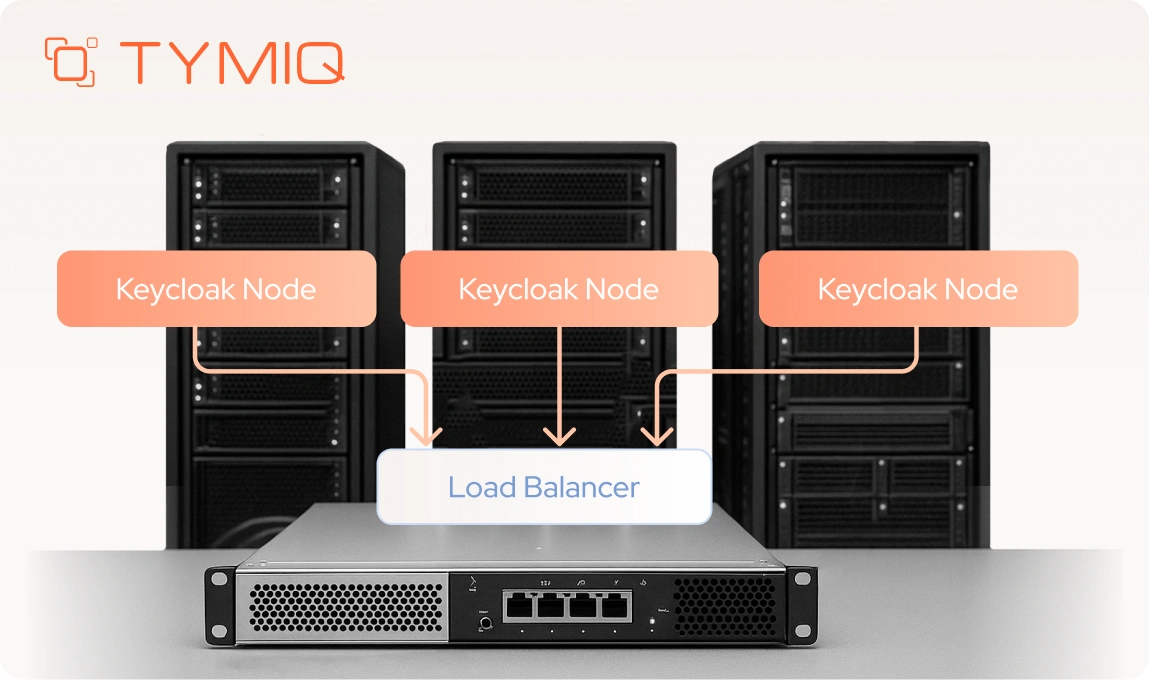
Keycloak’s deployment shapes how stable your onboarding flows feel to users. These recommendations come from the practical work of running Keycloak in environments where outages and misconfigurations show up immediately. They focus on patterns that reduce risk and keep the identity layer predictable.
1. Use the Keycloak Operator on Kubernetes
The Operator automates scaling and upgrades and keeps configuration changes in one place. It reduces the manual steps that usually cause production issues.
2. Split development, test, and production into separate realms
Each environment needs isolation. This makes changes easier to review and prevents accidental edits to the production realm.
3. Move secrets into a dedicated secret manager
Tools like HashiCorp Vault or cloud secret managers handle rotation and access control cleanly. This removes sensitive data from configurations and pipelines.
4. Require mutual TLS (mTLS) for internal service traffic
mTLS protects traffic between Keycloak and your services. It closes internal security gaps that often remain unnoticed until an audit.
5. Manage Keycloak configuration through GitOps or CI/CD
Version your flows, authenticators, and settings. This gives you a clear history of changes and a safe rollback path when something behaves unexpectedly.
6. Monitor admin actions and authentication events
Event tracking uncovers issues early – failing OTP steps, token errors, or configuration changes that don’t match expectations.
7. Test cluster behavior under real onboarding patterns
Onboarding traffic often spikes. Test flows like magic links, SMS verification, and SSO under load to confirm predictable behavior.
A solid deployment doesn’t remove every issue, but it eliminates the ones that shouldn’t happen in the first place. With these foundations in place, onboarding becomes easier to maintain and far less prone to surprises as your system grows.
Conclusion
Onboarding often becomes fragmented as teams add new applications, channels, and integrations without central coordination. The result is a patchwork of flows that confuse users and create avoidable support work. A unified onboarding system offers clarity, consistency, and a better experience from the start.
Keycloak provides the tools needed to build this foundation: flexible authentication flows, magic link support, custom authenticators, profile management, and strong observability. With the right design, these capabilities create onboarding paths that behave predictably across devices and identity providers.
At TYMIQ, we collaborate with organizations to design and deploy onboarding architectures built on Keycloak. These systems integrate smoothly with existing applications, scale with product growth, and provide a consistent identity foundation. If you're ready to rebuild your onboarding flow with a reliable and modern approach, our team is here to help.

.svg)



.svg)


