



Last update on February 5, 2026
When businesses modernize legacy software, one of the most common upgrade paths is moving from .NET Framework to modern .NET (formerly known as .NET Core). This transition helps teams improve performance, scalability, cloud readiness, and long-term maintainability.
Modern .NET has become the default choice for building new services and applications thanks to its cross-platform runtime, strong container support, and continuous improvements in developer tooling. At the same time, migrating an existing .NET Framework solution is rarely a “one-click” process — it requires planning, compatibility assessment, refactoring, and testing.
In this guide, we’ll walk through when .NET Framework to .NET migration makes sense, what’s typically incompatible, which migration strategies work best, and how to migrate step-by-step with minimal risk.
In this article, we'll delve into the intricacies of converting .NET Framework to .NET Core and offer insights to consider throughout the migration journey.
.NET Framework vs modern .NET (Core): In what cases does the migration makes sense
Before starting the migration, it’s important to confirm whether moving from .NET Framework to modern .NET is the right decision. In some cases, staying on .NET Framework can be reasonable - for example, if your system depends on Windows-only technologies, unsupported libraries, or legacy frameworks that are expensive to replace.
However, for many business applications, modern .NET brings clear benefits: improved performance, better scalability, cross-platform hosting, faster release cycles, and cloud-native deployment options.
Common scenarios where migrating to modern .NET is a smart move
Migrating from .NET Framework to modern .NET typically makes sense if:
Your app needs better performance and scalability
Modern .NET supports high-throughput workloads and modern performance patterns. You can scale services horizontally, optimize startup times, and improve resource utilization more effectively.
You want cross-platform hosting
If you want to run your application on Linux, deploy to containers, or reduce Windows licensing constraints, modern .NET is a natural upgrade path.
You plan to move to the cloud or containers
Modern .NET is built for modern infrastructure: Docker images, Kubernetes deployments, and cloud hosting on Azure, AWS, or GCP.
You are modernizing architecture (microservices, APIs, modular apps)
Modern .NET makes it easier to break down monoliths, build APIs, introduce background workers, and move toward microservices.
You want long-term maintainability and easier hiring
Modern .NET is widely used in new projects, and it’s easier to find engineers with strong modern .NET experience compared to legacy-only stacks.
When staying on .NET Framework may be the better option
Migration is not always the best investment. Staying on .NET Framework may be reasonable if:
- Your system depends heavily on WebForms
- Your application is built around System.Web and custom HttpModules/Handlers
- You rely on COM/ActiveX, legacy Windows-only dependencies, or old vendor libraries
- You have a limited budget and no modernization roadmap
- The application is stable, low-risk, and does not require cloud scalability
In these cases, a phased modernization approach may work better than a full rewrite or immediate migration.
Why to migrate from .NET Framework to .Net (Core)?
Here are the most common business and engineering reasons to upgrade a .NET Framework application:
Faster product innovation
Modern .NET evolves quickly with better language features, runtime performance improvements, and modern development patterns.
Better performance and resource efficiency
Modern .NET typically provides higher throughput and better performance under load, which can reduce infrastructure costs over time.
Improved scalability for high-traffic systems
Modern .NET supports scalable architectures, container deployments, and efficient horizontal scaling.
Better cloud readiness
Modern .NET integrates well with cloud platforms and supports cloud-native patterns such as distributed caching, health checks, and observability.
More flexible deployment options
You can host modern .NET apps in:
- IIS (Windows)
- Linux servers (Nginx + Kestrel)
- Docker containers
- Kubernetes clusters
Stronger ecosystem and a broader talent pool
Modern .NET is the current Microsoft platform for new development, making hiring and long-term maintenance easier.
Improved security posture and modernization options
Modern .NET supports modern security standards and encourages secure defaults. With the right architecture, it becomes easier to implement centralized authentication, authorization, and secure secret management.
Technologies that are not supported in modern .NET (and what to use instead)
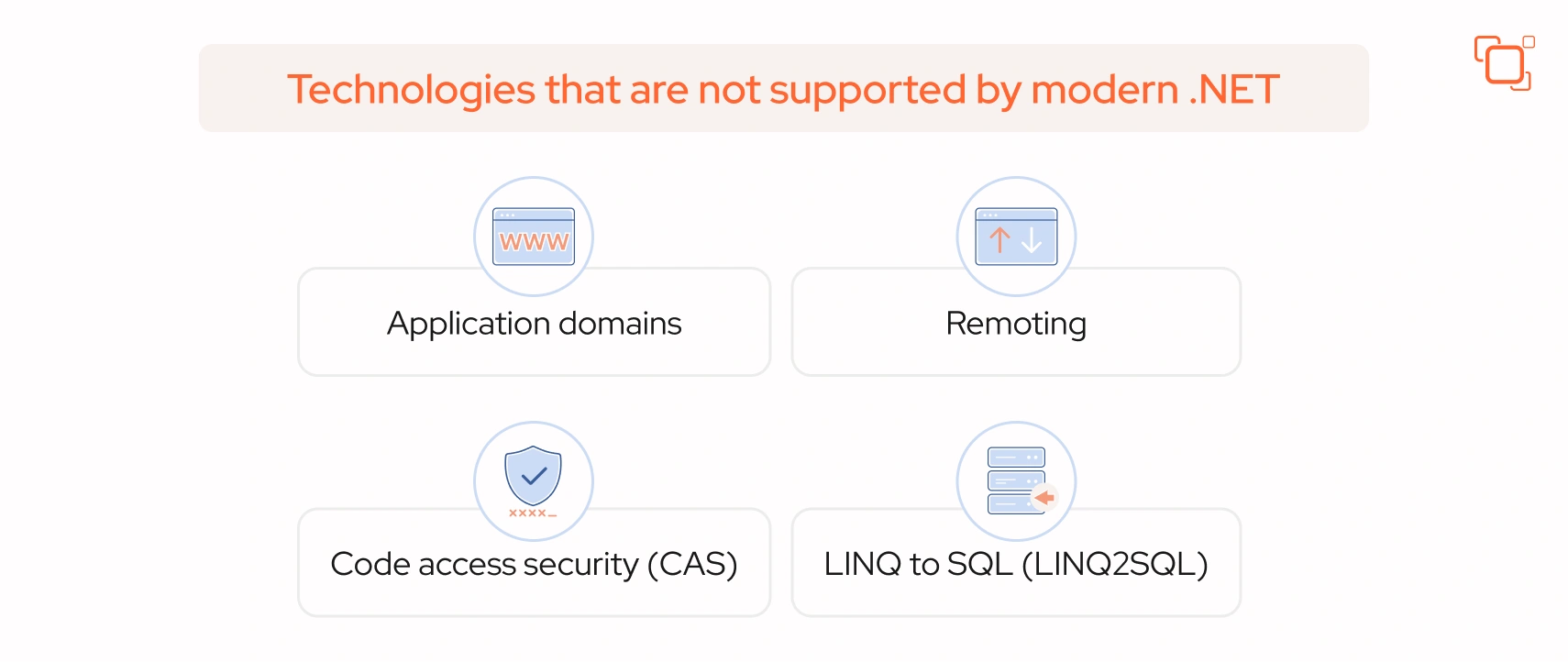
One of the most important parts of .NET Framework for modern .NET migration is identifying incompatible technologies early.
Application domains
- Modern .NET does not support AppDomains for isolating apps in the same process. Instead, consider utilizing the AssemblyLoadContext class for dynamically loading assemblies.
.NET Remoting
- .NET Remoting, a technology facilitating inter-application communication, is not available in modern .NET due to the absence of application domains. Consider alternatives such as web services or other inter-process communication technologies like gRPC.
Code access security (CAS)
- Code access security (CAS), a security feature in .NET Framework, is not supported by default in modern .NET. However, you can still manage permissions for assemblies through various options:
- Implement role-based security for application security.
- Utilize resource-based security for more granular control.
- Employ an external authorization service for centralized authorization management.
LINQ to SQL (LINQ2SQL)
- LINQ to SQL, a .NET Framework component for managing relational data as objects, is not supported in the latest versions of .NET. Instead, consider using Entity Framework Core to achieve similar functionality, including support for transactions, views, and stored procedures.
System.Web and classic ASP.NET pipeline
If your application uses System.Web (ASP.NET MVC 5, WebForms, HttpContext.Current, etc.), migration requires significant changes.
Instead, use ASP.NET Core middleware pipeline + dependency injection + modern configuration patterns.
WCF
WCF server-side support is not part of modern .NET out of the box.
Alternatives:
- gRPC (recommended for internal services)
- REST APIs
- CoreWCF (depending on use case)
The same logic applies beyond server frameworks - desktop-bound business tools face an identical fork. See how this plays out when migrating legacy Excel VBA macros to ASP.NET, where the same "extend the old runtime vs. rebuild on the new pipeline" decision applies.
By understanding the limitations and alternatives to these technologies, you can navigate the migration process more effectively and ensure a successful transition to new .NET.
Steps to convert .NET Framework to modern .NET (formerly .NET Core)
Once you decide to take the significant step to migrate from .NET Framework to the current .NET platform, you'll encounter two primary approaches: automatic and manual. Each approach offers distinct advantages and considerations, allowing you to tailor your migration strategy to best suit your specific needs and circumstances.
Option 1: Automatic migration using .NET Upgrade Assistant
For those seeking a streamlined migration process, the .NET Upgrade Assistant appears as a standout solution. This tool conducts a thorough analysis of your existing .NET Framework application, offering insightful suggestions and recommendations for transitioning to modern .NET.
Not only does it identify compatibility challenges along the way, but it also generates a comprehensive report to serve as a valuable reference point throughout the migration journey. With the .NET Upgrade Assistant at your disposal, navigating the right path becomes more efficient and manageable than ever before.
It typically helps:
- upgrade project files
- identify unsupported APIs
- migrate NuGet dependencies
- generate a report of blockers and recommended actions
This approach is often faster for simpler applications or as a starting point for complex systems.
Option 2: Manual migration (recommended for complex apps)
When undertaking the manual migration process from .NET Framework, there are essential steps that you should adhere to.
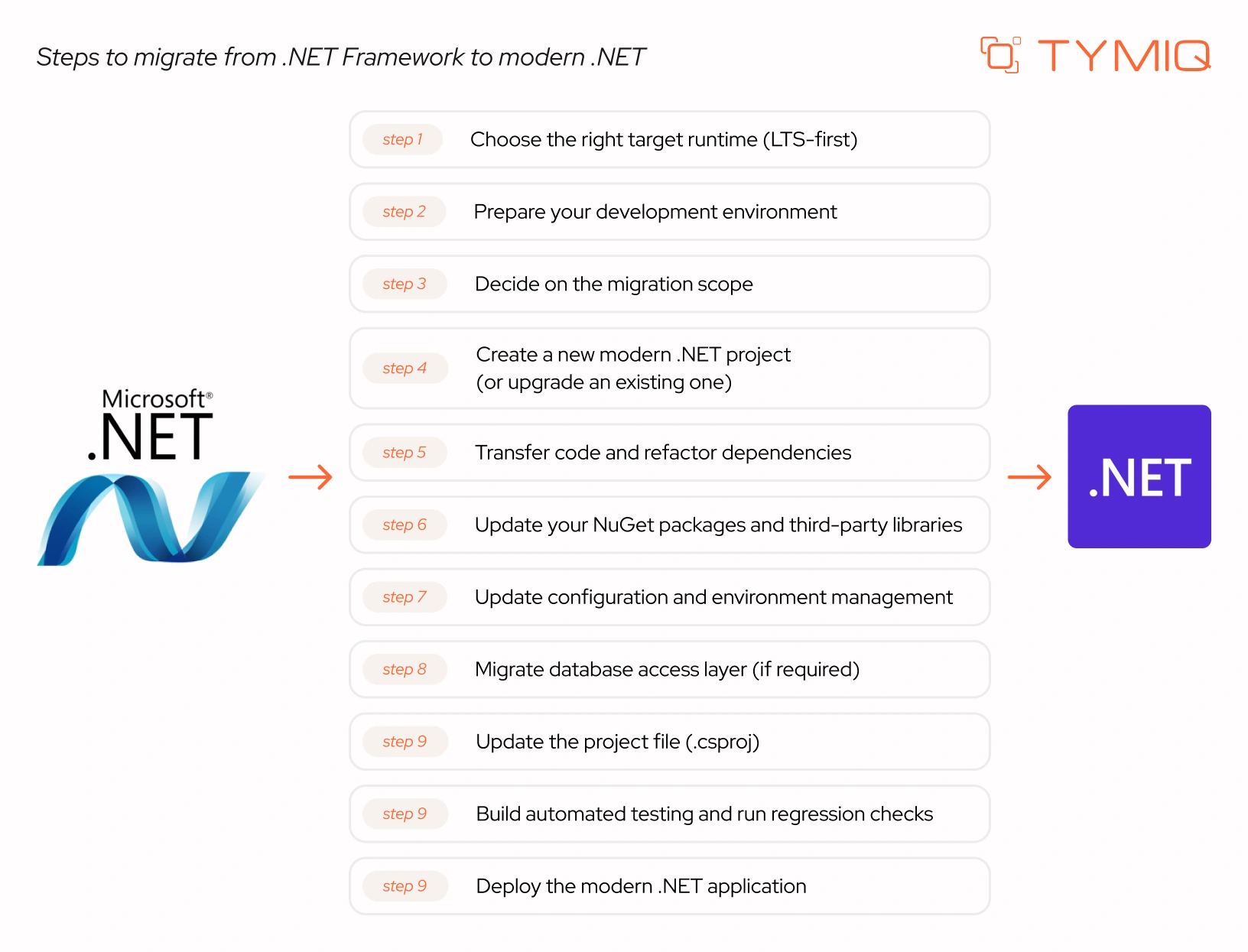
Choose the right target runtime (LTS-first)
Do not assume the latest runtime is always the best choice. For business applications, targeting a long-term supported (LTS) version is usually the safest path.
Prepare your development environment
Download and install the .NET Core SDK, ensuring proper configuration of the development environment. The SDK equips you with essential tools and libraries necessary for application development.
Decide on the migration scope
Define what you migrate first:
- single project
- shared libraries
- API layer
- background services
- full solution
For large systems, start with a proof-of-concept migration of one module.
Create a new modern .NET project (or upgrade an existing one)
Depending on the app type, create a suitable project template:
- ASP.NET Core Web App (MVC/API)
- Worker Service
- Class Library
- Console App
Transfer code and refactor dependencies
Move the files and dependencies from your existing project to the new one. Ensure to include any necessary NuGet packages and adjust your code to ensure compatibility with the new .NET.
Update your NuGet packages and third-party libraries
Migrate your NuGet packages by managing them in Visual Studio. Right-click on "References" and select "Manage NuGet Packages."
And if a package has no modern replacement:
- check vendor support
- replace with a maintained alternative
- isolate legacy logic in a compatibility layer
Update configuration and environment management
In modern .NET, configuration typically uses:
- appsettings.json
- appsettings.{Environment}.json
- environment variables
Avoid storing secrets in config files. Use local user secrets for development and secret managers (cloud vaults) for production.
Migrate database access layer (if required)
For applications with databases, transfer the data to the new project. Visual Studio offers convenient "Export" and "Import" functionalities to facilitate this process. Additionally, you can utilize the "Generate Scripts" feature to create an SQL script for data migration.
Database migration is not always required. What usually changes is the data access layer.
Update the project file (.csproj)
Once you've migrated your code, dependencies, and data, proceed to transfer the .csproj file. Copy the file from your old project and make sure to adjust it to reference the new SDK correctly. Modern .NET uses SDK-style project files, which are simpler and more flexible.
If you have a multi-project solution, consider multi-targeting (for libraries) as a safe bridge:
- build the same library for .NET Framework and modern .NET
- migrate consumers gradually
Build automated testing and run regression checks
After migrating your application to modern .NET (Core), conduct comprehensive testing to confirm its proper functionality before deploying it for users.
If tests don’t exist, create a minimal automated suite for critical business paths before migration.
Deploy the modern .NET application
Get your migrated app out there! Deployment options depend on your infrastructure:
- IIS hosting (Windows) for minimal operational changes
- Linux + Nginx + Kestrel for cost-efficient hosting
- Docker containers for portability
- Kubernetes for scalable enterprise deployments
Main challenges of .NET Framework to modern .NET migration
Migrating legacy applications involves both technical and organizational challenges.:
Library compatibility
- Certain libraries may not be accessible in modern .NET, prompting the need to identify and replace them with suitable alternatives. Moreover, implementing specific functionalities may require different strategies in the new environment.
API changes and removed features
- Modern .NET is not a drop-in replacement for .NET Framework. Consequently, certain portions of the original application may require revision to align with the revamped API structure.
Configuration and deployment differences
- Configuration and deployment procedures may require adjustments to function optimally in .NET Core environments. This might involve modifying configuration settings, revising deployment scripts, and verifying compatibility with updated infrastructure.
Architecture refactoring
Legacy systems may require modernization of:
- authentication/authorization
- dependency injection
- logging
- background jobs
- distributed caching
Cost and resource planning
- Migrating from Framework demands significant time and resources for testing, code refactoring, and adjustments. Prudent planning and resource allocation are imperative during the migration process.
How to prepare your system for migration (practical checklist)
Modern .NET is known as a popular open-source, cross-platform, and high-performance framework for developing web applications. However, migrating from .NET Framework isn't a straightforward task. To ensure a successful transition, it's essential to navigate through the following steps diligently.
1. Evaluate compatibility: Use tools like the .NET Portability Analyzer to reveal if there are any unsupported APIs, libraries, or features, guiding necessary adjustments.
2. Review API dependencies for potential replacements: Refactor code to utilize compatible alternatives and prioritize cross-platform libraries for seamless integration.
3. Update third-party libraries: Ensure compatibility of 3rd party libraries with modern .NET. Update to compatible versions or explore alternative options if necessary. Contact library vendors for support if a compatible version is unavailable.
4. Develop a comprehensive test suite: Automated tests aid in detecting regressions or issues introduced during migration. Test critical paths carefully to validate system behavior.
5. Plan phased rollout: For business-critical systems, use staged deployment:
- dev → staging → production
- canary releases where possible
- rollback strategy
6. Create a detailed migration plan: Outline steps, timelines, and potential risks. Prioritize critical components and consider phased migration to minimize disruptions. Ensure that team members and stakeholders communicate and coordinate effectively.
7. Thoroughly test the migrated system to ensure proper functionality: Validate critical functionality and stability before deploying to the production environment.
Your seamless migration from .NET Framework to modern .NET (formerly .NET Core) with TYMIQ
In summary, moving from .NET Framework to modern .NET (formerly .NET Core) may require careful planning, but it’s a highly achievable and worthwhile modernization step. With a clear migration strategy and proven best practices, teams can reduce risks, avoid costly regressions, and deliver a stable upgrade with confidence.
Before starting the migration, it’s essential to prepare thoroughly — assess compatibility, review API dependencies, update third-party libraries, build a reliable test suite, define a phased migration plan, and validate the system end-to-end. Following these steps helps ensure a smooth transition and allows you to fully benefit from modern .NET’s performance, scalability, and cloud-ready capabilities.
If you need expert support, TYMIQ provides end-to-end .NET migration services tailored to your goals. From initial assessment and roadmap planning to implementation, testing, and deployment, our engineers will help you overcome compatibility challenges and modernize your application successfully on modern .NET.




.svg)


