


.png)


Every few months, another AI tool promises to modernize legacy software faster than ever. Product demos show code translated in minutes, documentation generated on demand, and dependencies mapped with a single prompt.
Those demonstrations are impressive. They also create an obvious question.
Has AI fundamentally changed legacy modernization, or has it changed how engineering teams approach it?
Many organizations discover the answer once a modernization project begins. AI can save weeks of manual work, though experienced architects still make the decisions that determine whether a project succeeds.
By the end of this article, you'll understand which modernization activities benefit most from AI, where human expertise continues to lead, and why successful modernization combines proven engineering practices with AI instead of relying on automation alone.
Legacy modernization hasn't changed as much as many people think
Search for "AI modernization," and you'll find plenty of headlines suggesting a completely new way of modernizing software. Modernization projects rarely do.
Engineering teams begin by inventorying applications, identifying dependencies, understanding business processes, and deciding which systems deserve investment. AI becomes valuable once that work is underway and mostly contributes to:
- Reducing technical debt
- Lowering maintenance costs
- Improving scalability
- Strengthening security
- Delivering new features faster
- Preparing systems for future growth
None of those objectives appeared because generative AI entered the market. They have shaped modernization programs for years.
The same applies to modernization strategies. Architects still decide whether an application should be rehosted, replatformed, refactored, rebuilt, replaced, or retired. AI doesn't choose between those options. Business priorities, technical constraints, budgets, and long-term architecture continue to drive those decisions.
Suppose a financial institution wants to modernize a twenty-year-old Java platform. Before writing new code, the team still needs to answer familiar questions.
- Which applications support critical business processes?
- Which systems depend on one another?
- Which components create the highest operational risk?
- Which modernization strategy makes business and financial sense?
AI can help collect much of this information faster. Architects still decide what happens next.
Gartner's 2026 framework focuses on improving work that already exists in every modernization project. The modernization lifecycle stays the same. AI helps teams complete several activities faster and with less manual effort.
Architects and engineering teams still lead:
- modernization strategy
- architecture decisions
- business priorities
- governance
- production approval
Modernizing a single application is one thing. Modernizing an entire portfolio introduces a different set of challenges.
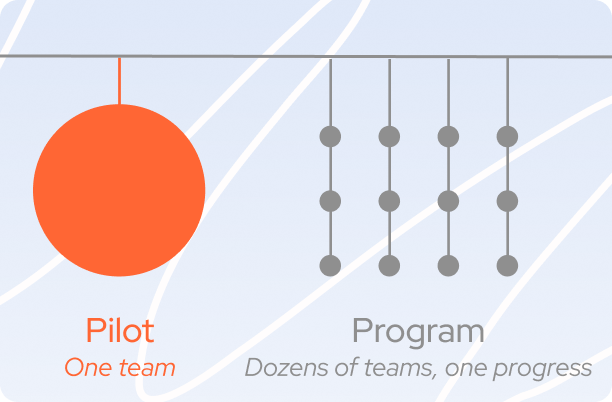
Deloitte's State of AI in the Enterprise 2026 surveyed 3,235 business and technology leaders across 24 countries and found that many organizations have already started seeing measurable returns from AI. Scaling those gains across the business is where progress slows.
These findings mirror what many modernization teams experience in practice. The first AI-assisted migration often delivers quick wins. The tenth migration raises different questions.
Can every application use the same architectural patterns? Is application knowledge documented consistently? Can security, compliance, and testing be applied across the portfolio without creating new bottlenecks?
Those questions determine whether AI becomes part of the organization's engineering capability or remains a collection of successful one-off projects.
Traditional modernization vs AI-assisted modernization
Modernization projects still follow the same lifecycle they did before generative AI entered the picture.
Teams assess existing applications, decide what should change, migrate workloads, validate business logic, and deploy to production. Those steps remain familiar across cloud migrations, platform modernization, and large-scale application transformation.
The difference lies in how much manual work sits behind each stage.
Where AI delivers the biggest return during modernization

Code migration attracts most of the attention during modernization projects. In reality, much of the schedule disappears long before the first line of code is rewritten.
Teams spend weeks understanding unfamiliar applications, rebuilding missing documentation, tracing dependencies, and verifying that years of accumulated business logic will continue working after migration.
AI is helping reduce that workload. Let’s discover the most impactful areas.
Understanding unfamiliar applications
Picture a team inheriting a Java application that's been evolving for twenty years.
Some of the original developers have left. Architecture diagrams haven't been updated in years. Business rules live partly in the code and partly in the experience of people who remember why certain decisions were made.
Before anyone proposes a migration strategy, the team needs to answer a handful of practical questions.
Typical discoveries during application assessment:
Finding those answers manually often means reviewing thousands of source files, tracing dependencies across multiple systems, and speaking with subject matter experts.
AI accelerates that discovery phase by analyzing repositories, identifying relationships between components, and generating architectural summaries that teams can verify. Instead of piecing together an initial understanding from scattered information, architects begin with a structured overview that improves as domain experts review it.
Rebuilding technical documentation
Documentation is usually one of the first things they discover is incomplete.
API references may no longer reflect production. Architecture diagrams often describe an earlier version of the system. Some business rules exist only in source code or in the knowledge of experienced developers.
Recreating that documentation manually across dozens or hundreds of applications takes considerable effort.
Modern AI tools can generate an initial documentation set directly from the codebase, including service descriptions, API summaries, dependency maps, and explanations of application logic.
Documentation AI can help generate:
- API summaries
- Service descriptions
- Dependency maps
- Class and module relationships
- Explanations of business logic
- Draft architecture documentation
The difference is where the effort goes. Teams spend less time producing the first draft and more time improving its quality.
Discovering hidden dependencies
Enterprise applications almost never operate in isolation.
One customer-facing platform may exchange information with identity providers, payment gateways, ERP systems, reporting platforms, messaging services, data warehouses, and dozens of internal APIs. Missing even one dependency can delay deployment or introduce unexpected production issues.
AI helps expose those relationships much earlier.
Instead of building dependency maps one connection at a time, architects receive a broader view of how applications interact across the environment. That visibility supports more accurate effort estimates, clearer migration sequencing, and earlier identification of technical risks.
Accelerating testing and code transformation
Migration isn't complete once code has been translated or refactored.
Applications still need to demonstrate that existing business processes behave exactly as expected after modernization. Regression testing, integration testing, and validation frequently consume a substantial portion of project timelines.
GitLab's 2026 Global DevSecOps Report suggests that AI is changing software delivery in a more nuanced way than simply making developers faster. Individual productivity is improving, while review, governance, and long-term maintainability are becoming larger parts of the engineering workflow.
GitLab 2026: AI adoption in software development
Legacy modernization has never been limited by writing code alone. Understanding existing systems, validating business logic, testing migrated applications, and maintaining engineering standards often require more effort than implementation itself.
GitLab's findings reflect that shift. As AI accelerates routine development, activities such as code review, governance, testing, and architectural validation account for a larger share of the overall effort. Modernization teams spend less time producing code and more time confirming that migrated applications remain reliable, maintainable, and aligned with business requirements.
Much of AI's value comes from reducing the effort required to understand legacy systems, rebuild technical knowledge, document applications, analyze dependencies, and prepare software for migration.
Those gains give engineering teams more capacity to focus on architectural decisions and business outcomes that determine whether modernization succeeds.
Modernization decisions still require business context
AI can analyze source code, identify dependencies, generate documentation, and recommend implementation options. That's a huge advantage when you're trying to understand a complex system.
But modernization isn't driven by code alone.
Many of the decisions that determine project success live outside the repository: product strategy, compliance requirements, customer commitments, budgets, and internal processes. AI can't infer those from the codebase.
Choosing the right modernization strategy
Two applications built on the same technology can end up on completely different modernization paths.
For example:
Technology is only part of the equation. Teams also weigh:
- business value
- operational risk
- expected lifespan
- integration complexity
- available investment
AI can estimate technical effort. Choosing the modernization strategy remains an architectural and business decision.
Preserving business logic
Legacy systems often contain functionality that seems unnecessary until someone explains why it exists.
A pricing rule may reflect a decade-old customer agreement. A validation step may satisfy an industry regulation. A nightly batch job might support a partner system that exchanges data during a specific maintenance window.
Removing those details because they look obsolete can introduce production issues that are difficult to trace back to the migration.
Planning the migration sequence
Modernization is rarely a "move everything" project.
A typical sequence looks more like this:
Understand the landscape → Prioritize business-critical systems → Untangle dependencies → Modernize in phases
AI can help map those dependencies and estimate migration complexity. The order of execution still depends on business priorities, available resources, and how much organizational change the business can absorb.
Designing the target architecture
Every modernization project is also an opportunity to rethink the architecture.
For some organizations, microservices provide clear operational benefits. Others get better results by improving an existing modular architecture. Hybrid environments continue to make sense where performance, compliance, or data residency requirements limit cloud adoption.
Those choices aren't purely technical. They're shaped by operating costs, governance, team expertise, resilience goals, and long-term product strategy.
AI makes technical analysis faster. Architects turn that analysis into decisions that fit the business.
Building an AI-assisted modernization workflow

Every modernization project has one task nobody volunteers for: digging through years of undocumented code to figure out what still matters. AI happens to be good at that part.
Engineering teams can use it to speed up repetitive work without changing how modernization programs are planned or governed.
The biggest gains usually come from improving the early stages of modernization, long before code is migrated. Here's where AI fits naturally into the workflow.
The strongest AI-assisted modernization projects usually follow the same sequence.
1. Understand the system before asking AI to change it
Resist the temptation to start with code transformation.
Begin by building a picture of the application.
Ask questions such as:
- Which services communicate with each other?
- Which APIs and integrations are still active?
- Which scheduled jobs support critical business processes?
- Which modules haven't been used for years?
- Which components create the highest migration risk?
Once those answers are available, AI becomes much more useful. It can summarize code, explain dependencies, generate documentation, and identify migration candidates with far better accuracy because the project already has context.
2. Use AI to prepare the first draft, not the final answer
AI performs well on work that engineers rarely enjoy repeating.
Typical examples include:
- generating technical documentation
- mapping dependencies
- explaining unfamiliar code
- creating baseline test cases
- proposing migration steps
Every recommendation still deserves review.
Imagine AI identifies several classes with no incoming references and suggests removing them. During architecture review, the team discovers those classes support a quarterly reporting process triggered by an external scheduler. Nothing in the repository points to that dependency.
Business rules often live outside the codebase. That's why experienced engineers review every recommendation before implementation.
3. Measure whether AI is saving engineering time
Many teams begin by tracking prompt counts or AI-generated lines of code.
Neither tells you whether modernization is becoming more effective, so focus on engineering outcomes instead.
Review these metrics after every migration, not only at the end of the program.
Patterns become easier to spot across multiple applications. You may discover AI consistently reduces assessment time but provides little benefit during testing. Or documentation quality improves while review time stays unchanged. Those observations help teams decide where AI adds value and where engineering expertise continues to have the greatest impact.
AI changes execution. Modernization still depends on engineering decisions.
By now, one thing is probably clear: AI hasn't rewritten the rules of legacy modernization.
Successful projects still begin with understanding the application, choosing the right modernization strategy, validating business logic, and carefully planning every release. Those decisions continue to shape the outcome of every migration.
What has changed is how much time engineering teams spend getting there.
Whether you're modernizing a single business-critical application or planning a portfolio-wide transformation, the objective stays the same: deliver software that's easier to maintain, less expensive to operate, and ready for future change. AI helps teams reach that objective faster. Experience makes sure they reach it the right way.


.svg)


