


Expert materials
Stay tuned for the latest trends and updates in the IT industry. Learn the best practices and expert opinion on the software development and modernization from our technical specialists.
Latest article
An insurer connects an AI model to underwriting data. Seconds later, a risk recommendation appears. Six months later, compliance needs a complete record of the data used, the model version, the human review, and the policy transaction linked to the decision.
If the migration architecture cannot reconstruct the decision path, model selection is only one piece of the work.
Deloitte’s research found 94% of financial services firms plan to increase AI investment, yet 29% cite AI risk management, and 28% cite regulatory obligations as obstacles to realizing returns.
Here's something we run into a lot: teams build the AI first and figure out compliance later. For insurance, that's backwards. Data lineage, model records, human review, testing, monitoring – all of it needs a home before production, not after.
We broke down exactly what changes and where each piece fits.
Why does compliance change an AI migration plan?
A conventional core migration tracks a known, closed set of entities: policy records, claims records, billing, customer data, business rules, interfaces, and product configuration. Each one has a defined source, a defined target, and a mapping exercise between the two.
An AI-enabled migration adds extra complexity a conventional checklist was never built to hold.
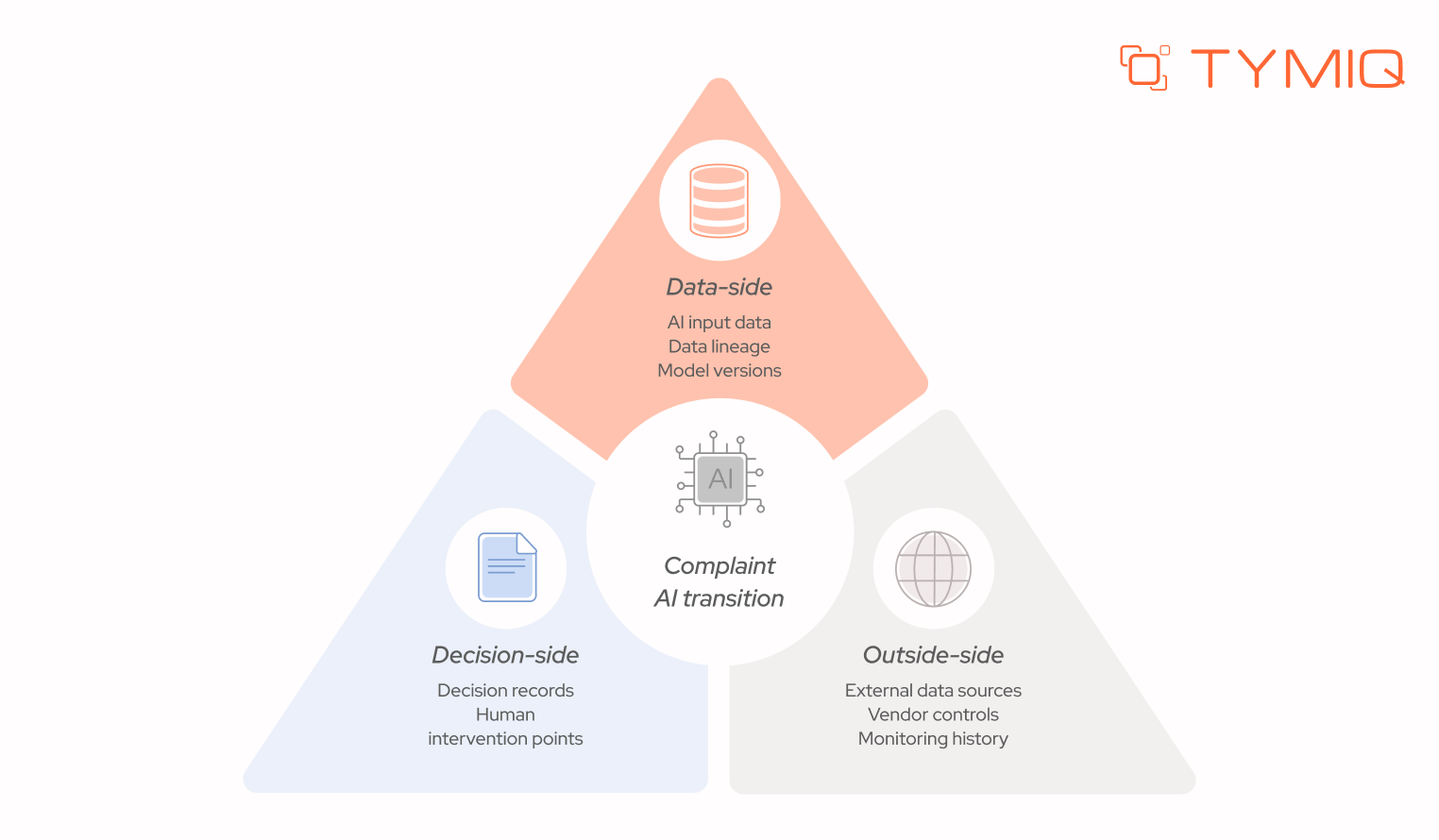
The NAIC's 2026 material on artificial intelligence states that insurers remain responsible for applicable insurance laws and regulations when using AI, and the NAIC is developing examination tools covering AI governance, risk mitigation, potentially high-risk models, and AI input data. Responsibility for the output sits with the insurer regardless of which vendor built the model underneath it.
A conventional migration follows a pretty standard sequence:
A compliance-first AI migration follows a longer one:
The second sequence puts governance decisions ahead of the technical build.
What must an insurer be able to prove about an AI-assisted decision?
Move from the migration plan to one concrete underwriting decision, and the requirement gets specific fast: can the insurer reconstruct the complete path from source data to policy action?
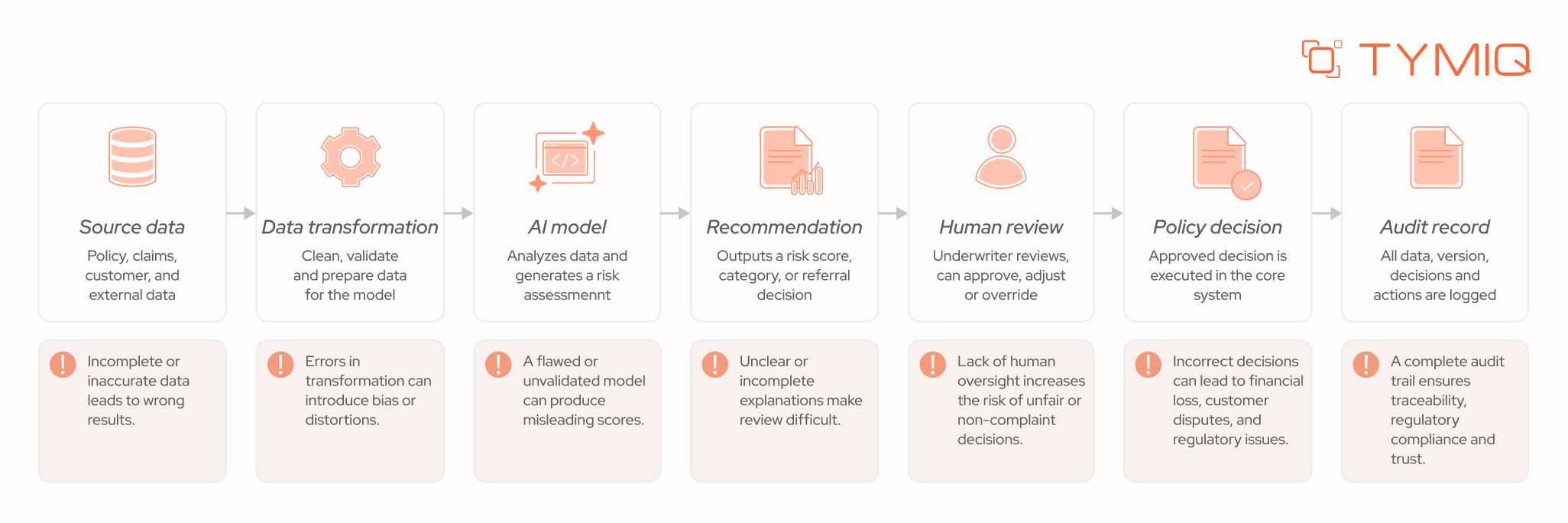
Each stage in that chain needs to produce something durable enough to survive a reconstruction request filed months after the transaction closed.
Where did the decision data come from?
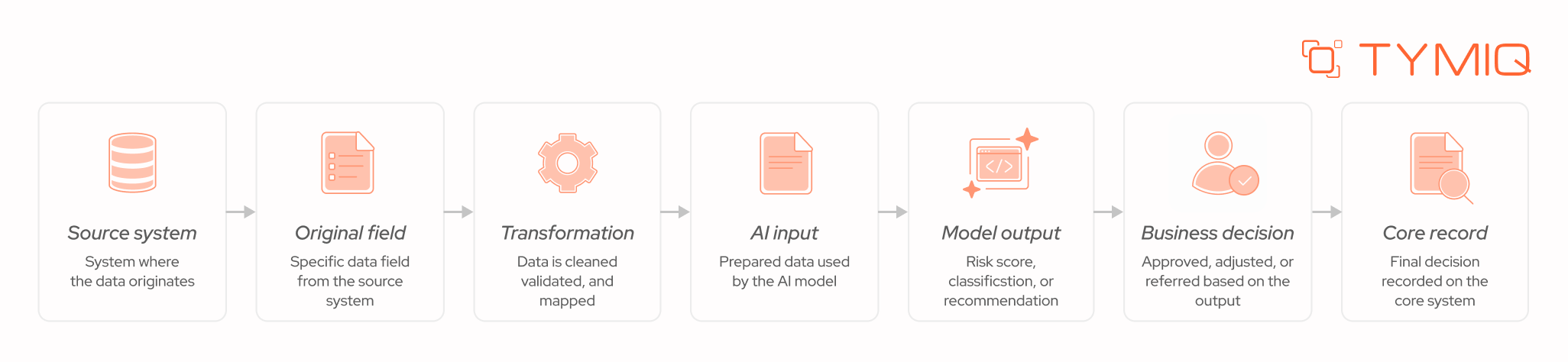
Reconstructing a decision starts with the source system, the data owner, the original field, any transformation applied, any external source pulled in, and the exact data the AI model received as input. The NAIC's June 2026 Big Data and Artificial Intelligence Working Group materials cover AI inventories, data sources, data purpose, demographics, bias and missing-data analysis, third-party contractual controls, and auditability and transparency considerations. A migration plan that treats data lineage as a documentation task after the fact is building toward a gap the working group's own framework is designed to catch.
Which model produced the result?
The second reconstruction question is model identity: model name, model version, validation status, deployment date, input dataset, change history, and owner. A recommendation produced by model version 4.2 and a recommendation produced by version 4.3 are not interchangeable for audit purposes, even when the underlying logic looks similar.
PwC's August 2026 research on insurance model risk management frames model governance around the decisions a model supports, its ownership, its inputs, its evidence trail, its monitoring, its override paths, and its change history. That framing maps directly onto what a migration architecture needs to capture at the point a model runs, not reconstructed later from logs that were never built to support it.
What happened after the AI recommendation?
The last reconstruction question separates the AI recommendation from the executed insurance transaction:
- what did the model recommend
- did a human review it
- was it overridden
- what was the final decision
- which core transaction followed
- what audit record captured all of it
That distinction matters because an AI recommendation and a bound policy are two different events with two different levels of accountability attached to them, and a migration architecture that collapses them into one log entry loses the ability to show which one happened.
Which regulatory requirements become architecture requirements?
Regulatory language turns into engineering language the moment it specifies a record, a log, an oversight step, a test, a document, or a monitoring requirement. The table below shows that translation directly.
What does the US regulatory environment require?
US insurance AI compliance is developing through state insurance regulation, examination activity, regulatory guidance, and existing insurance requirements, not one single federal standard.
The NAIC's implementation map for the AI Model Bulletin, as of April 1, 2026, shows 25 jurisdictions had adopted the bulletin, with four additional jurisdictions carrying insurance-specific AI regulation or guidance of their own.
A national insurer cannot treat AI governance as one uniform technical checklist under that map. Jurisdiction, product line, decision type, data source, and the AI system's role in the decision can all change which controls apply, which means a migration architecture needs to be configurable by jurisdiction, not built around one fixed rule set.
What changes for insurers operating in the European Union?
The EU AI Act's consolidated text specifies, for high-risk AI systems, technical documentation, automatic event logging, transparency obligations, human oversight, quality management, risk management, data management, and post-market monitoring.
Not every insurance AI application qualifies as high-risk under the Act, and a migration plan should classify use cases individually and not assume the full high-risk control set applies across the board. Where a use case does qualify, the logging, documentation, and monitoring requirements above become concrete build items in the migration architecture.
What should change before data migration begins?
The regulatory requirements above only matter once they reshape the actual migration plan, starting with three specific changes to how the work gets sequenced.
1. Classify the AI use case first
Before a single record moves, get every AI use case on one list. Underwriting, pricing, claims, fraud, eligibility, referral, customer-facing decisions, all of it belongs in the inventory from day one.
That classification step determines almost everything downstream. A use case classified as high-risk under one jurisdiction's rules needs logging, human review, and monitoring built in from day one, while a lower-risk use case can move through the migration with a lighter control set.
2. Map data lineage before moving records
A migration team documenting only target-system fields misses the derived fields and transformations that merge the source data and what the model receives, and those derived fields are exactly what an examiner or auditor asks about first.
Roland Berger's August 2026 research on core insurance system transformation notes that legacy insurance systems often carry fragmented policy, premium, claims, actuarial, and financial data, and that core transformation programs commonly run €20 million to more than €100 million over two to five years.
Around half of core replacement programs miss their time or budget targets, with data migration complexity among the causes cited. AI adds a second reason to treat data mapping as a governance activity instead of a purely technical one. The same fragmented lineage that threatens a migration timeline is what breaks a decision reconstruction request later.
3. Define evidence requirements before integration
A compact evidence checklist covers model version, input data, timestamp, external data used, rules applied, the recommendation itself, a confidence measure, the human reviewer, any override, and the final decision.
Here's what a single decision record needs to hold, field by field:
This is the table we hand a CTO or compliance lead early. It answers what an auditor, a regulator, or a risk committee will eventually ask. Built this way, that request takes one lookup, no scramble across five systems.
Most content on AI in insurance stops at model selection. The requirement that matters here runs deeper: every underwriting or claims decision needs to stay explainable and verifiable on demand, and that requirement reshapes the migration plan itself, before it ever touches which model gets deployed.
How should human oversight fit into the migration architecture?
Evidence only matters if it connects to a workflow that decides when a human needs to look at a result before it becomes a policy action.
A simple decision path covers most cases: a missing required field routes to a request for source data or a referral to an underwriter, conflicting records route to data-ownership resolution, low model confidence routes to human review, a decision outside underwriting authority routes to human approval, and an unavailable external source routes to a defined fallback or referral rule.
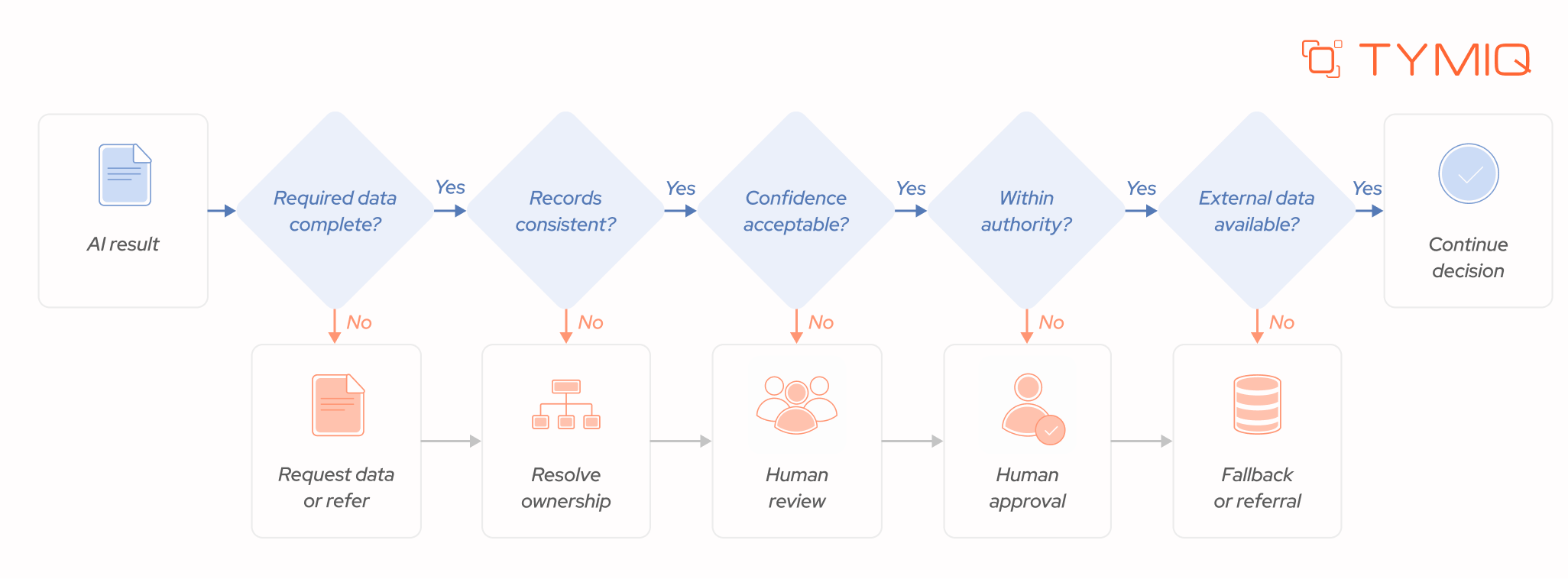
The Financial Stability Board's June 2026 consultation report proposes 12 sound practices covering organization-wide AI governance and the relevant stages of the AI development and deployment lifecycle, and human oversight checkpoints of the kind above sit squarely inside that lifecycle, not bolted on afterward.
Where should the AI service stop?
Three components carry distinct responsibilities, usually as follows:
The boundary matters more than the sequence here. The AI service produces analysis and a recommendation. The integration layer maps, validates, and routes that recommendation. The insurance core owns the policy record and executes the transaction. No component crosses into another's authority, which is what keeps the audit trail attributable to a specific system at each step.
How does compliance change migration testing?
Testing shifts from verifying that a system processes records correctly to verifying that a decision can be reproduced, reviewed, and reconstructed on demand.
Reproducing a previous AI decision means testing:
- the same input data
- the same model version
- the same rules
- the same relevant external data
- confirming the same expected output or a documented reason for any variation
Testing human override means confirming the system correctly triggers review under low confidence, missing information, conflicting records, authority limits, and referral conditions. Testing transaction reconstruction means tracing source systems through data access, AI underwriting, underwriter review, core transaction, and audit record, end to end.
A seamless process usually looks like this:
That third test gives the team a concrete production check instead of an abstract governance requirement to sign off on paper.
PwC's August 2026 case study on Encova Insurance's Guidewire Cloud modernization reports that Encova processed 3.5 billion historical data transactions at go-live, handled more than 140,000 upgrade artifacts with zero critical defects, and processed 5,800 submission quotes during the first week.
Large-scale core migration already demands validation at that scale before AI enters the picture. AI adds decision records, model controls, human-review paths, and evidence reconstruction on top of a test scope that was already substantial.
Does compliance require replacing the insurance core?
An insurer can introduce AI through an integration layer around an existing core when that core's architecture can expose the required data, route controlled transactions, preserve audit records, and maintain human authority over the final decision.
When can an integration-first approach work?
An integration-first approach works when the existing core executes transactions reliably, the required data can be accessed without a major rebuild, integration interfaces can support the new workflow, decision records can be retained at the level of detail examiners expect, and human review can be enforced at the points that need it.
When does deeper core modernization become necessary?
Deeper insurance core system modernization becomes necessary when the core cannot expose the data an AI use case requires, batch processing introduces delays the workflow cannot tolerate, business rules cannot be tested or accessed programmatically, transaction interfaces cannot support the new workflow shape, or the required evidence simply cannot be reconstructed from what the core produces today.
Appian and Synechron's August 2026 Open Underwriting Stack reference architecture connects legacy cores, SaaS applications, external data, AI process automation, and underwriting workflows without requiring immediate core replacement, and the companies describe auditability, control, and underwriter authority as architectural concerns built into the design from the start.
At a high level, the approach can be understood as a simple flow:
Existing core → Integration layer → AI underwriting → Human review → Controlled core transaction
That sequence gives an insurer a concrete architectural answer without treating core replacement as the automatic outcome of adding AI.
What should an AI compliance migration plan contain?
A complete plan covers an AI use-case inventory, regulatory classification, data lineage, model inventory, model version control, vendor assessment, decision logging, human oversight, integration controls, validation criteria, a rollback procedure, production monitoring, and audit evidence retention.
Classify → map → design controls → migrate → validate → monitor → audit
One of the latest research studies backs this up.
BCG describes modernization phases spanning discovery, redesign, planning, coding, testing, migration, and rollout, with AI assisting legacy discovery, business-rule extraction, documentation, testing, and migration itself. BCG also reports a 40% to 50% development productivity gain in one European insurer case.
The point worth taking from that research is sequencing: compliance requirements need to enter the modernization lifecycle at discovery and design, not get layered on during testing or rollout.
Can an insurer test AI compliance before production?
A five-question diagnostic gives a migration team a direct readiness check before go-live.
- Can the team identify every source behind an AI decision?
- Can the team identify the exact model version that produced a given result?
- Can an underwriter override the result under defined conditions?
- Can the organization reconstruct the complete decision later, from source data to policy action?
- Can the final recommendation be linked to the corresponding policy transaction?
A no on any of these five questions means the migration plan needs another architecture or control decision before production, not a documentation fix after the fact.
In a nutshell
Compliance-first AI migration changes the sequencing of the work itself. Regulatory requirements shape data mapping, architecture, model records, human-review paths, testing, monitoring, and evidence retention before production begins, not after an examiner asks the first question.
AI governance in insurance stops being a separate document the moment those requirements turn into logging schemas, review checkpoints, and test cases inside the same plan that handles policy records and claims data.
Get the sequencing right, and compliance stops being a phase you bolt on. It becomes how the migration was built.

Compliance-first AI transition for insurers: what changes in the migration plan?

When maintenance is no longer enough: The vendor’s role in software modernization
Legacy systems can’t scale or comply forever. Learn how proactive vendors modernize critical tech without disruption, delays, or audit risks.
Legacy modernization
Enterprise software
Migration
AI modernization: Developing clinical systems with artificial intelligence
Learn strategies, case studies, and governance best practices to deliver patient-centered, compliant, and future-ready care.
Legacy modernization
Healthcare
AI

5 ways to modernize legacy applications in healthcare: From rehosting to full rebuild
Learn how each method impacts cost, compliance, scalability, and patient care. Perfect for IT leaders in healthcare.
Legacy modernization
Healthcare
Migration

Why healthcare companies can’t afford to delay system upgrades
Legacy EHRs drain budgets, frustrate clinicians, and put patient safety at risk. Discover how modernization reduces downtime.
Legacy modernization
Healthcare
Migration
How to audit a legacy system before planning a migration
Over 80% of IT migrations fail due to hidden risks in legacy systems. Learn a proven audit framework with real cases, failure statistics, and best practices to cut migration risk.
Legacy modernization
Software maintenance
Migration
.svg)


